
18 July 2026
6 Business Apps That Need Email Integration — and How to Set It Up Properly
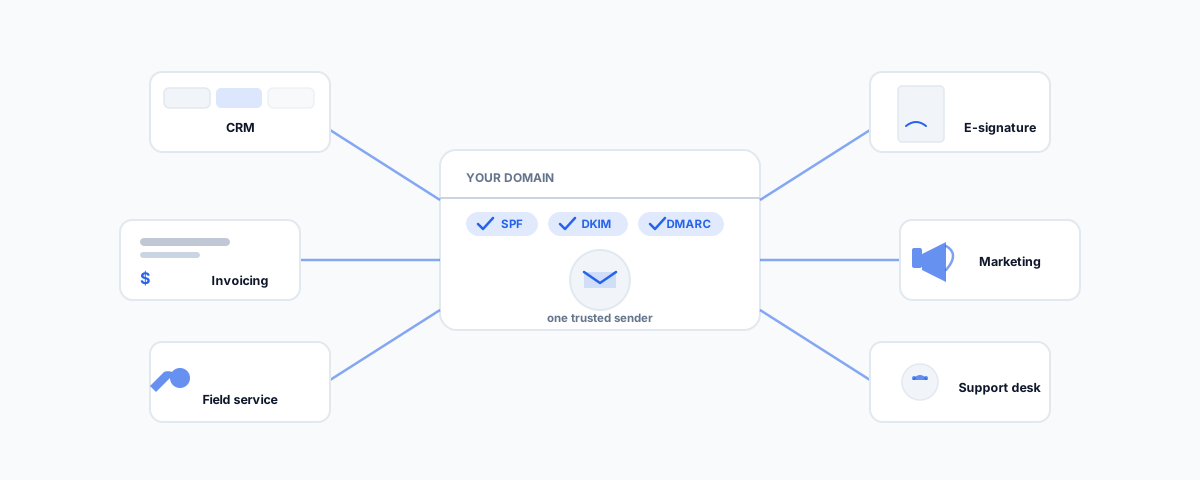
CRM, accounting, field service, e-commerce, e-signature, and marketing platforms all want to touch your business email — for different reasons. What each one actually needs, and the domain authentication (SPF/DKIM/DMARC) that has to be right before any of them will land in an inbox instead of spam.
Almost every app a small business adopts eventually wants a piece of its email. The CRM wants to log correspondence. The accounting platform wants to send invoices. The job management tool wants to chase overdue quotes. The e-signature tool wants to send documents and reminders. The marketing platform wants to send campaigns. Each request looks harmless on its own, but stack six of them onto one business domain without understanding what "email integration" actually requires, and the symptom is always the same: messages landing in spam, bouncing, or simply not arriving, with no obvious reason why. Here are six categories of app that need this properly, what each one actually needs from your email, and the two things underneath all of them that have to be right first.
Why "Email Integration" Isn't One Thing
Before the list, it helps to separate three genuinely different things that all get called "email integration." The first is reading and logging: a CRM connecting to your inbox to record correspondence against a contact or deal. The second is sending: an app sending email that appears to come from your business, whether that's a single invoice or a bulk campaign. The third is authenticating: proving to the receiving mail server that an app really is authorised to send as your domain, which is what determines whether any of the sending above actually lands in an inbox. Most integration headaches trace back to conflating these — treating "the app can send email" as the whole job, when authentication is the part that decides whether anyone ever sees it.
Six Applications That Need It, and Why
- CRM (HubSpot, Zoho) — logs email correspondence against the right contact or deal automatically, so nobody is manually copying threads into notes. We cover the practical setup in our guides to HubSpot beyond real estate and integrating Zoho CRM with Google Workspace.
- Accounting and invoicing software (Xero, QuickBooks, MYOB) — sends invoices, receipts, and payment reminders as your business, not a generic no-reply address, which matters for both trust and open rates. See our guides to Shopify's Xero integration and connecting Tradify to Xero.
- Field service and job management (Jobber, Tradify, ServiceM8) — quote follow-ups and invoice reminders are the single highest-value automation these tools offer, and they live or die entirely on deliverability; an unchased quote that silently lands in spam is worse than no automation at all. We cover this in automating Jobber and our broader guide to software for tradies in Australia.
- E-signature and proposal tools (PandaDoc) — sends documents for signature and chases the ones sitting unsigned, which only works if those emails are trusted enough to open. Our guide to inheriting a PandaDoc setup covers auditing exactly this kind of automation.
- Email marketing and marketing automation (Mailchimp, Klaviyo) — the highest-stakes sender of the group, because it combines real volume with legal consent obligations most other categories don't carry. See moving from Mailchimp to Klaviyo and Mailchimp automation for small teams.
- Support and helpdesk tooling — converts inbound email into tickets and replies as your support address, so a customer emailing support gets a reply that looks like it came from a person at your business, not a ticketing system.
The Two Things Every One of These Apps Needs From You
Underneath every item on that list sit two prerequisites that have nothing to do with which app you pick. The first is having an email platform these apps can actually connect to in the first place — which starts with choosing the right business email provider, since the API access, sending limits, and admin controls each app relies on vary meaningfully between providers. The second, and the one that actually determines whether any of this reaches an inbox, is domain authentication: SPF (Sender Policy Framework) lists which servers are allowed to send as your domain, DKIM (DomainKeys Identified Mail) digitally signs outgoing messages so receivers can confirm they weren't altered in transit, and DMARC (Domain-based Message Authentication, Reporting and Conformance) tells receiving servers what to do when a message fails those checks — and reports back to you when something does. Stack five apps sending "from" your domain without DMARC alignment configured properly for each one, and you get exactly the spam-folder symptom from the opening: not because any single app is broken, but because the authentication layer underneath all of them was never set up to expect more than one sender.
Compliance Isn't Optional for the Marketing Ones
For the CRM and marketing-automation categories specifically, deliverability is only half the requirement — the ACMA's spam guidance sets out what the Spam Act actually demands of commercial email sent to Australians: express (or clearly inferred, relationship-based) consent before sending, your correct business name or ABN in every message, an unsubscribe option that doesn't require logging in or providing extra personal details, and unsubscribe requests actioned within five business days. None of this is optional because the app supports "one-click campaigns" — the obligation sits with the business sending the email, not the software.
Setting It Up Without Breaking Deliverability
In practice this is a short, one-time job rather than an ongoing headache. Authenticate the domain properly once — SPF, DKIM, and DMARC configured together, not just whichever one a setup wizard defaulted to. Connect each app via its own OAuth or API integration rather than a shared password, so access can be revoked per app without resetting everything else. Turn on DMARC aggregate reporting and actually look at it occasionally, since it is the only place a misconfigured or forgotten app shows up before it damages your sender reputation for everything else. And treat consent tracking as part of turning on any marketing-automation integration, not an afterthought bolted on later.
Getting Help
Getting six different apps to send trustworthy, deliverable email from one domain is a one-time setup problem, not a permanent source of friction — but it is easy to get subtly wrong in ways that only surface as "email just doesn't seem to be landing" months later. If you would rather have your domain authentication, sender setup, and the apps sitting on top of it configured properly once, our email marketing service covers exactly this ground. Get the plumbing right, and every app you add after it just works.