
3 August 2026
DoorLoop vs Rent Manager: Why This Comparison Usually Answers Itself
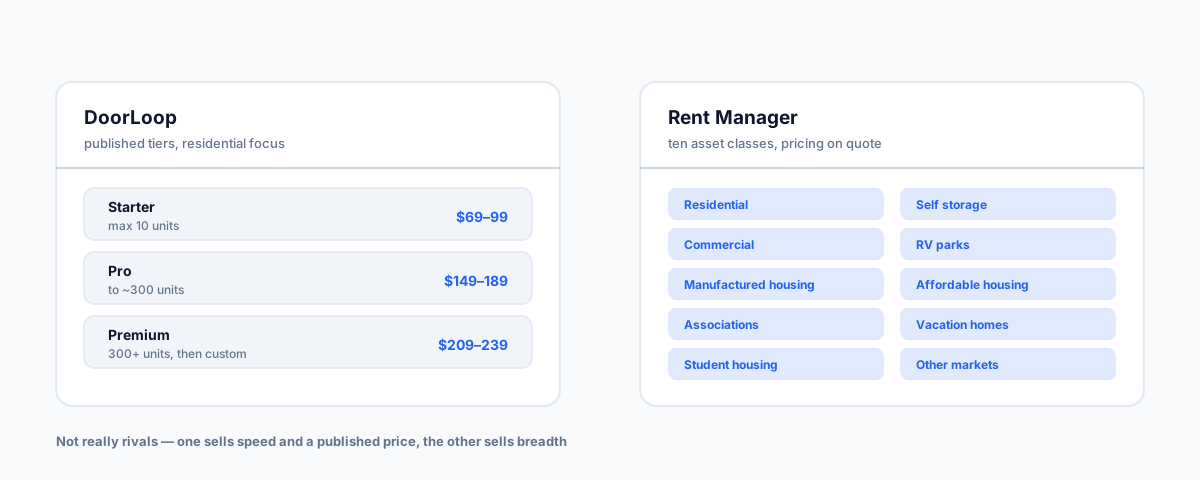
These two platforms turn up in the same search results and barely compete. DoorLoop sells transparent pricing and fast setup; Rent Manager sells breadth across ten asset classes and deep configurability. What each is genuinely built for, why the review scores mislead, and why a landlord probably should not buy either.
DoorLoop and Rent Manager come up together constantly, which creates the impression they're rivals fighting over the same buyer. Spend an hour with both and it's clear they mostly aren't. They appear in the same search results, they occupy the same software directories, and they get compared to death — but the situations where a buyer is genuinely torn between them are narrower than the volume of comparison content suggests.
One thing worth knowing before you weigh any of that content: a large share of the "DoorLoop vs Rent Manager" articles you'll find are published by DoorLoop. That doesn't make them wrong, and vendor comparisons are often more factually careful than people assume. It does mean the framing — which axes get compared, which get skipped — is chosen by one of the two parties. Read accordingly.
The One-Line Version
DoorLoop competes on price transparency and speed to get running. Rent Manager competes on breadth and configurability. Those are different products solving different problems, and the question that actually resolves the choice isn't "which is better" — it's whether your portfolio is one asset type or several, and whether you need the system to bend to your process or your process to fit the system.
What DoorLoop Is Actually Good At
DoorLoop publishes its pricing, which in this category is itself a differentiator. At the time of writing the tiers run:
- Starter — capped at 10 units, promoted at $69/month billed yearly against a regular $99.
- Pro — up to roughly 300 units, promoted at $149/month against a regular $189.
- Premium — for portfolios above 300 units, promoted at $209/month against a regular $239, with unlimited users and storage.
Two things worth noting, because most comparison articles flatten them. The widely-quoted "$69/month" is a promotional, annually-billed rate rather than the standing price — and the Starter plan it belongs to stops dead at ten units, which is a much smaller box than "$69/month" implies. Above 300 units you're into custom pricing and talking to sales anyway, which quietly erodes the transparency advantage at the top end.
What you get for it is genuine: modern interface, notably fast onboarding, a built-in CRM, and the accounting, portals and maintenance tracking a residential operation needs. If you manage residential property and want to be running this month rather than next quarter, that's a real proposition.
What Rent Manager Is Actually Good At
Rent Manager, from London Computer Systems, has been in this market since the late 1980s, and it shows in ways that are easy to miss on a feature grid.
The clearest differentiator is asset breadth. Rent Manager's own site lists ten property categories: residential, commercial, manufactured housing, associations, student housing, RV parks and campgrounds, self storage, affordable housing, vacation homes, and other markets. If your portfolio spans several of those, this is the thing that matters — the alternative is running separate systems and reconciling between them.
The rest of the depth follows from serving that kind of operator:
- A complete accounting system — AP and AR, electronic bank reconciliation, and simultaneous cash and accrual accounting. That last one is not a common feature and it's a genuine reason to choose this platform.
- Over 450 reports out of the box, plus report-writing tools for the ones that aren't.
- A customisable interface and an API, so workflows can be shaped around how you actually work rather than the reverse.
- Telephony and call-centre features, including phone broadcasts sent from inside the program — genuinely unusual in property software, and meaningful if you run a team fielding tenant calls all day.
- Deployment choice — cloud or on-premise, which still matters to some operators for data-control reasons.
The cost of that depth is real: expect a steeper learning curve and a training investment measured in weeks, not an afternoon.
Why the Review Scores Mislead
You'll see DoorLoop rating around 4.86 against Rent Manager's 4.47 on the major directories, and it's tempting to read that as a verdict. It isn't, or at least not the one it looks like.
Aggregate review scores in software are heavily driven by onboarding experience and time-to-value. A platform you can be productive in within a day will systematically out-score one that needs two to four weeks of training, even in cases where the second platform is unambiguously the correct choice for the buyer. The scores are measuring friction, which is a real cost — just not the same thing as fitness for your portfolio.
Read them as "DoorLoop is easier to start using", which is true and useful. Don't read them as "DoorLoop is more capable", which the numbers don't support either way.
What the Pricing Models Tell You
Rent Manager doesn't publish pricing at all — the site routes you to a demo or an information request. Figures circulate second-hand in comparison articles, but they aren't confirmed at source, so treat any specific number you see as unverified.
That's mildly annoying as a buyer, but it's also information. Quote-only pricing in this category usually means the implementation genuinely needs scoping — asset mix, module selection, migration, training. Software that can be sold at a published flat rate is software that assumes every customer's setup looks roughly the same. Neither approach is dishonest; they're describing different products.
If You're Actually a Landlord, Probably Neither
The comparison is usually framed for landlords, and that framing is where most of the confusion originates. Both of these are platforms for people who manage property as a business. Rent Manager in particular is built for operations running hundreds to thousands of units across mixed asset types, with the team and training budget that implies.
If you own a handful of investment properties, buying either is a category error — you'll pay for a rent roll you don't have and configure workflows for a team of one. The property management software landscape post lays out the tiers properly, and the honest answer for a small landlord usually sits several rungs below both of these. For Australian readers specifically, the local landlord options are a better starting point than either American platform.
The Australian Catch
Neither DoorLoop nor Rent Manager does Australian statutory trust accounting. If you hold rent on behalf of owners, that's a compliance obligation set by your state's legislation, not a feature preference — and it reorders your shortlist before any of the above matters. We covered why that constraint dominates the accounting-integration question separately; the same logic applies here. These platforms are worth evaluating in Australia if you're a self-managing owner or running commercial property on your own account, and much harder to justify if you're an agency.
How To Choose
- One asset type, residential, under 300 units, want to be live quickly — DoorLoop, and check whether you fit inside a tier or land in custom pricing.
- Several asset types in one portfolio — Rent Manager, largely on breadth alone. Running self storage or manufactured housing alongside residential is where it stops being a close call.
- You need the system to match an established process — Rent Manager, for the customisation and API.
- You need cash and accrual accounting simultaneously, or on-premise deployment — Rent Manager; DoorLoop isn't competing here.
- Ten units or fewer — neither. You're being sold a rent roll platform for a portfolio that doesn't need one.
- You manage student housing specifically — Rent Manager treats it as a first-class asset type, though how you structure room-by-room leases matters more than the platform badge.
Getting Help
The expensive mistake in this category isn't picking the wrong platform — it's picking one tier too high and paying for capability you never configure, or one tier too low and migrating again in eighteen months. Our Small Business IT Support service works through what your portfolio actually needs against what each platform is built for, and handles the migration and integration work once that's settled.