
23 October 2026
Syncing Site Timesheets to MYOB Payroll: What "Direct Sync" Actually Means (and Where It Breaks)
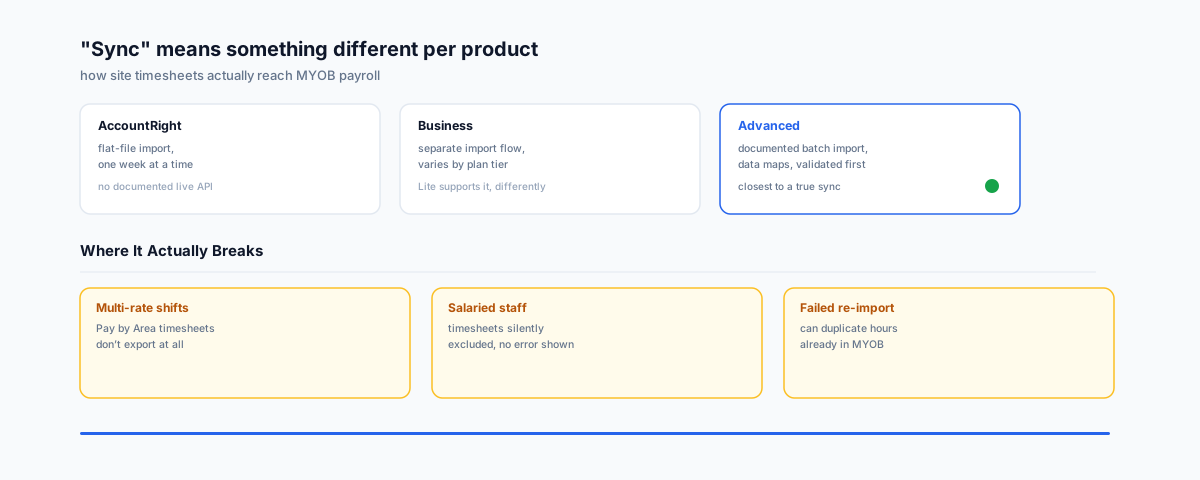
"Sync site timesheets to MYOB payroll" sounds like a live, two-way connection. For most MYOB products it's actually a file export and import step with real failure modes — unsupported pay rates, excluded salaried staff, and duplicate entries on re-import. What each MYOB product actually does, and how to set it up without the surprises.
"Sync site timesheets to MYOB payroll" sounds like it should mean a live connection — hours logged on-site this morning, sitting in the pay run by this afternoon. For most MYOB products, what actually happens is closer to a file export and a file import, done by a person, on a schedule they control. That's not necessarily a problem, but it's a different thing than "sync" implies, and the gap between the two is exactly where timesheets go missing, pay rates come out wrong, or a failed import quietly duplicates a week of hours.
It Depends Which MYOB You're Running
We covered this same split for ecommerce in our piece on MYOB's ecommerce integrations — MYOB isn't one product, and the same splits show up again here:
- MYOB AccountRight handles timesheet import as a flat file, imported one week at a time. There's no documented live API for this step; third-party time-tracking tools export a file that AccountRight then ingests, matching employees by an exact ID.
- MYOB Business — the newer, browser-based product — imports timesheets through its own separate flow, and which plan tier you're on changes what's actually supported.
- MYOB Advanced is the one with a genuinely documented, structured process: MYOB's own Advanced user guide walks through setting up data maps, creating a timesheet batch, importing a CSV or time cards, mapping the data, and validating it before it ever touches a pay run. If you're on Advanced, this is the product tier where "import" starts to feel closer to what "sync" implies.
If you're not sure which MYOB product your business runs, that's the first thing to confirm before setting any of this up — the steps, and what's even possible, are genuinely different between them.
The Three Ways It Actually Breaks
Deputy's own documentation on its MYOB integration is a good case study, because it's explicit about where the connection has limits that a lot of businesses only discover after they've relied on it:
- Multi-rate timesheets often aren't supported. Deputy's own MYOB integration page and its help centre note that if you use "Pay by Area" to apply different pay rates for different work areas on the same shift, those timesheets can't be exported to MYOB — the integration doesn't support it, and the hours simply won't make it across.
- Salaried staff can be silently excluded. Salaried workers' timesheets in Deputy aren't exported to MYOB at all. If your site has a mix of hourly tradies and salaried supervisors, the salaried half of that list needs a separate process — it won't show up as an error, it'll just quietly not be there.
- A failed import can duplicate hours on retry. On the AccountRight flat-file route, re-importing a file after a failed attempt — without first restoring from a backup — can duplicate entries already sitting in MYOB's timesheets. For a weekly pay run, that's the kind of mistake that doesn't get noticed until someone's pay packet looks wrong.
None of these are reasons to avoid the integration — they're reasons to test it against one real pay period before trusting it with the whole roster.
Timesheets Landing in MYOB Doesn't Remove the STP Obligation
Getting hours into MYOB cleanly is only half the job. Once they're there, Single Touch Payroll Phase 2 still governs how that pay is categorised and reported to the ATO — income type, allowance breakdowns, and the rest of it don't get fixed by a good timesheet import. We've covered the specific mistakes businesses keep making under STP Phase 2 in a separate guide — worth reading alongside this one if payroll categorisation hasn't been checked since Phase 2 became permanent.
It's also worth noting that Deputy's integration with Xero, which we've written about separately, handles award interpretation and leave loading in a more automated way than its MYOB connection does — if your business is choosing between accounting platforms and timesheet automation matters a lot to you, that's a genuine difference worth weighing, not just a feature-list tick.
Getting It Working Cleanly
- Confirm your exact MYOB product and plan tier first — AccountRight, Business, and Advanced are not interchangeable here.
- Match employee IDs before the first real export, not after. The time-tracking tool's Payroll ID needs to exactly match the MYOB Employee Card ID, and mismatches cause the whole batch to fail rather than partially import.
- Check whether your award structure uses multi-rate shifts or salaried staff — if either applies, confirm up front how (or whether) those hours will actually make it across, rather than discovering it on pay day.
- Run one full pay period as a trial before switching over fully, and keep the manual process available as a fallback until the trial period has gone cleanly at least twice.
Getting Help
A timesheet-to-payroll setup that actually holds up is less about picking a tool and more about knowing where that tool's documented limits are before they become a pay-run surprise. Our Workflow Automation service can help map out which MYOB product you're on, what your time-tracking tool actually supports, and set up a process that doesn't rely on someone remembering to check it every week.