
25 July 2026
"Trades Software That Actually Works On-Site: Offline Mode, Compliance Docs, and On-the-Spot Invoicing"
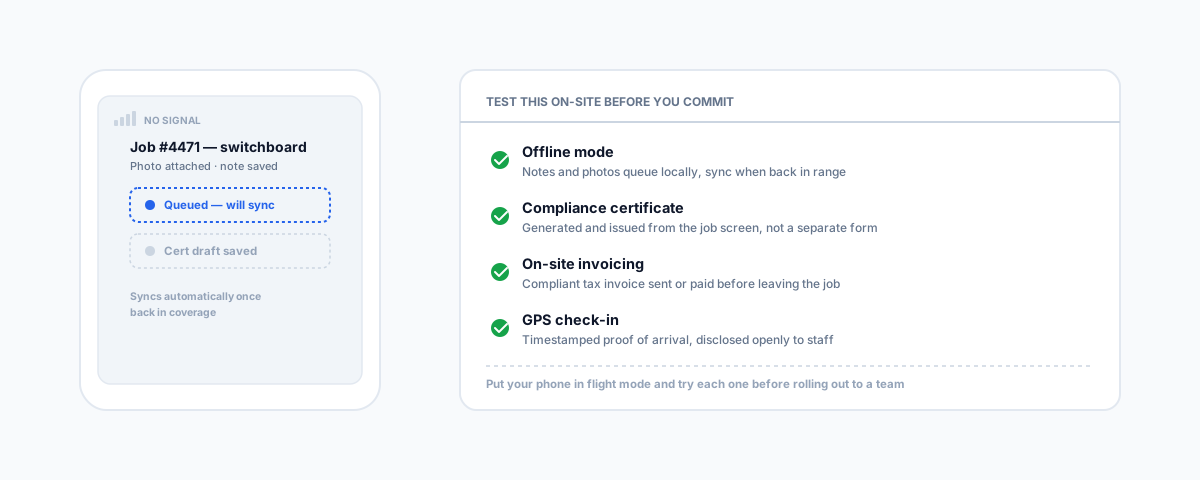
Vendor comparisons test tidy office screens. The real test of trades software happens on a roof, underground, or in a switchboard room with no signal — offline mode, compliance certificates, and on-the-spot invoicing are what actually decide whether it gets used properly.
Most reviews of trades software are written from behind a desk, comparing dashboards, pricing tiers, and feature checklists in good wifi. That is not where the software actually gets tested. The real test happens on a roof, in a switchboard room, under a house, or on a rural property forty minutes from the nearest 4G tower — and a platform that looks identical to its competitors on a laptop can fall apart completely the moment a job requires saving a note, attaching a photo, or issuing a certificate with no signal at all. If you have already picked a platform based on price and features, it is worth going back and testing these specific things before you commit a whole team to it.
Offline Mode Isn't Optional
Plenty of trades software markets itself as having offline capability, but there is a real difference between a genuine offline mode and one that just fails quietly. A proper implementation queues everything you do locally on the device — job notes, photos, time logs, signatures — and syncs automatically the moment coverage comes back, with nothing lost in between. A weak implementation either blocks the action outright ("no connection — try again later") or, worse, appears to save it and silently drops the update once you're back in range. Basements, rural properties, new housing estates that haven't had towers upgraded yet, and older commercial buildings with thick concrete are all common enough that this isn't an edge case for most trades — it's a weekly occurrence, and it's worth deliberately testing with your phone in flight mode before rolling a platform out to a whole team.
Photos, Compliance Certificates, and Proof of Work
A before-and-after photo attached directly to the job record is worth more than the same photo texted to the office and forgotten, and this matters even more for anything regulated. Electricians in NSW, for example, must issue a Certificate of Compliance for Electrical Work within seven days of completing safety and compliance testing, to the customer, NSW Fair Trading, and the electricity distributor — with on-the-spot fines of up to $1,000 per occasion for not supplying one, and a five-year record-keeping expectation on top. Other states run equivalent schemes for electrical and gas work. Software that generates and files that certificate against the job automatically, on-site, at the point the work is finished, removes a genuine compliance risk that a paper form filled in later — or never — creates. If a platform treats compliance documents as an afterthought rather than a first-class part of the job record, that's a real gap, not a minor one.
On-the-Spot Invoicing and Payment
Finishing a job and invoicing it three days later from the office is where small trades businesses bleed cash flow — not through bad debts exactly, but through the delay itself, and the extra admin hours spent chasing invoices that a same-day payment would have avoided entirely. Software with genuine on-site invoicing lets a tradie generate and send — or take payment on — an invoice before they've left the driveway. Whatever you use still has to produce a compliant tax invoice: the ATO's own requirements for GST-registered businesses cover business name, ABN, date, description of work, and the GST amount, and for sales of $1,000 or more the buyer's identity as well — worth checking your platform's invoice template actually includes all of it rather than assuming it does.
GPS Tracking and Proof of Arrival
Proof of arrival — a timestamped, geotagged check-in against the job — settles "we were never on site" disputes before they become an argument, and it does the same job for team accountability without a supervisor having to ring around checking locations manually. It's worth raising with staff openly rather than switching it on quietly: what's tracked, when, and why, so it reads as job verification rather than surveillance.
How to Actually Decide
If you haven't picked a platform yet, our comparison of the best software for tradies in Australia covers ServiceM8, Tradify, Fergus, Ascora, AroFlo, and simPRO laddered by business size — start there. Once you've shortlisted two or three, use everything above as a field test rather than trusting the vendor's marketing page: put your phone in flight mode and try saving a job note, attach a photo and confirm it queues rather than fails, check whether a compliance certificate can actually be generated and issued from the job screen, and try invoicing a completed job before leaving the site. A platform that handles all of that cleanly is worth more than one with a longer feature list that only works from the office. Our guide to Tradify's Xero integration and to unifying SimPRO, Xero, Outlook, and Deputy in one dashboard both cover what happens to this data once it lands back in the office — the field experience and the accounting sync are really two halves of the same decision.
Getting Help
Choosing a platform is one decision; making sure it's actually configured so the field data flows cleanly into your invoicing, payroll, and job costing is the part that determines whether it saves time or just adds another screen to check. Our Workflow Automation service connects trades software to the rest of your systems properly, so a job finished on-site shows up as an invoice, a paid job, and accurate job costing without anyone re-entering it by hand.