
6 August 2026
9 Approval Workflow Software Solutions for Australian Businesses (2026)
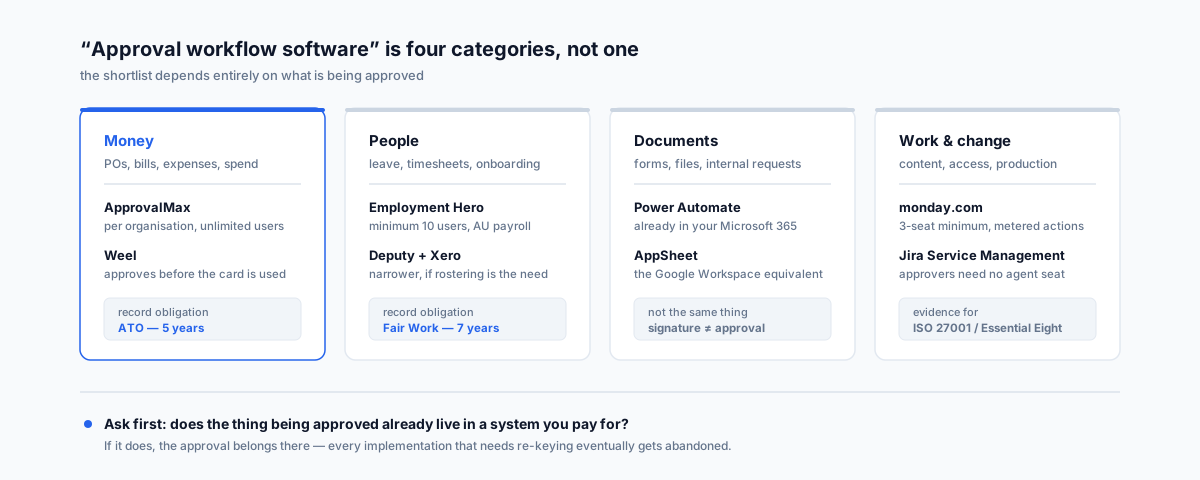
Approval workflow software isn't one category — it's four, and buyers routinely shop the wrong one. Nine options sorted by what actually gets approved: money, documents, people, and work. Including the uncomfortable fact that most businesses asking already own an approval engine they've never switched on.
Nobody goes looking for approval workflow software on a good day. The search almost always follows a specific event — an invoice paid twice because two people thought the other had checked it, a discount nobody authorised that turned a job unprofitable, a leave request approved over SMS that then didn't exist when payroll ran. Someone says "we need a proper approval process", and within a week there's a shortlist.
The shortlist is usually wrong. Not because the products on it are bad, but because "approval workflow software" describes at least four different categories of product that don't compete with each other, and the search results mix them together indiscriminately. A tool that's excellent at routing purchase orders is useless for approving annual leave, and neither one helps you sign a contract.
Here's how the category actually breaks down, nine options that are genuinely worth considering, and the honest answer to the question most buyers should ask first.
What "Approval Workflow" Actually Means
Four different things, depending on what's being approved:
- Money — purchase orders, supplier bills, expense claims, spending before it happens. The approval exists to stop money leaving without authorisation, and the record exists to satisfy the ATO later.
- People — leave, timesheets, shift swaps, new hires, pay changes. The approval is an employment decision, and the record is a Fair Work obligation.
- Documents — contracts, quotes, policies, anything that gets signed. Approval and signature are related but not the same thing, which trips people up constantly.
- Work and change — content going live, an access request, a production change, a design going to print. The approval is a quality or risk gate.
A tool built for one of these can usually be forced to handle another. It's rarely worth it. The forcing is where implementations die — you end up maintaining a generic form that duplicates data already sitting in Xero or your HR system, and then reconciling the two.
The Question That Narrows The List Fast
Before looking at any product: does the thing being approved already live in a system you pay for?
If bills sit in Xero, leave sits in your HR platform, and jobs sit in your field service tool, then the approval belongs in that system or in something that plugs directly into it. Buying a standalone approval platform means re-keying the data, and every implementation that requires re-keying eventually gets abandoned.
The corollary is the uncomfortable one. If you're on Microsoft 365, you are already paying for a capable approval engine and probably haven't switched it on. That doesn't make it the right answer for every case, but it should be the first thing you rule out, not the last.
1. Microsoft Power Automate And Teams Approvals
What it is: the approval engine built into Microsoft 365. Approvals show up in Teams, in Outlook, and in a mobile app, and the requester sees status without asking anyone.
Why it leads this list: the Approvals connector is a standard connector, and a Microsoft 365 licence entitles you to build and run cloud flows using standard connectors — SharePoint, Teams, Outlook, Forms, Excel Online, OneDrive. For a document sitting in SharePoint, a form response, or an email-triggered request, there is genuinely nothing more to buy. Microsoft's own Power Automate licensing documentation sets out exactly where the seeded entitlement stops.
Where it stops: premium connectors — most third-party systems, SQL, HTTP requests — need Power Automate Premium at AU$22.40 per user per month on annual billing. The licensing question is about who runs the flow, and getting it wrong is the most common Power Automate surprise.
Who shouldn't: anyone not on Microsoft 365, and anyone whose approval subject lives in a finance or HR system rather than a document library. We've written up nine Power Automate flows that actually pay off and a walkthrough of SharePoint notification and email-filing workflows if this is the direction you're headed.
2. Google Workspace And AppSheet
What it is: the equivalent answer for Google shops. AppSheet builds an approval app over a Google Sheet or a connected data source, with a mobile app and email approvals.
The pricing detail that matters: AppSheet Core is included with most paid Google Workspace plans. Standalone it runs from around US$5 per user per month for Starter and US$10 for Core, but if you're on Business Standard or Plus you may already have it.
Where it stops: AppSheet asks more of you than Power Automate does. You're building an app, not configuring a flow, and it shows. It's genuinely capable — offline mobile capture is a real strength for anyone approving things from a site or a vehicle — but budget a weekend, not an afternoon.
Who shouldn't: anyone who wants approvals working by Friday with no build effort.
3. ApprovalMax
What it is: the missing approval layer for Xero and QuickBooks Online. Xero's native controls are thin — ApprovalMax adds multi-step approval on bills, purchase orders, sales invoices and journals, with the approval trail attached to the transaction.
Why it matters in Australia: a very large share of Australian small business runs on Xero, and bill approval is the single most common thing people are trying to solve when they search this category. ApprovalMax is priced per organisation, not per user — unlimited users, requests and approvals on every tier — which is the correct shape for this problem, because approvers are typically directors and managers who approve a handful of things a month. Published figures run roughly US$54, US$83 and US$121 per organisation per month across Standard, Advanced and Premium.
What the tiers actually change: bill-to-purchase-order matching, budget checking and journal approvals sit on Advanced, not Standard. If the reason you're buying is to stop invoices being paid that don't match a PO, Standard won't do it. Premium adds batch payment verification and API access.
Who shouldn't: anyone not on Xero, QBO or NetSuite. It's a layer, not a platform.
4. Weel
What it is: an Australian spend management platform — virtual and physical cards with approval built in before the money moves, plus reimbursements and bill payments.
The category difference: ApprovalMax approves an invoice that already exists. Weel approves the spend before a card transaction is possible. If your leak is staff buying things and telling finance afterwards, that's a different problem and this is the tool shape for it.
Pricing: Basic starts at A$135 per month from 5 users at A$10 per additional user; Premium at A$375 per month from 10 users at A$8 each. Prices exclude GST. Read the approval capability against the tier carefully — Basic covers simple single-step payment approvals, Premium adds multi-step but caps it at three approval rules and two steps per payment type, and only Enterprise is genuinely unlimited. Approval delegation for someone on leave is a Premium feature, which matters more than it sounds when your only approver goes to Bali.
Who shouldn't: businesses under about five card users. The floor price makes the per-head maths ugly.
5. Employment Hero
What it is: an Australian HR and payroll platform where leave, timesheet, expense and onboarding approvals are native rather than bolted on.
Why it's on the list: people approvals are a legal record, not a convenience. Approving leave in a chat app produces nothing you can hand to Fair Work. Employment Hero produces the record as a by-product of the approval, which is the entire point.
Pricing: HR Essentials at A$10 per employee per month and HR Engage at A$14, both with a minimum of 10 users — so a team of four pays for ten. Payroll is a separate A$10 per employee per month line.
Who shouldn't: anyone with fewer than about ten employees, who will pay the minimum regardless. If rostering and timesheet approval is the actual need, Deputy paired with Xero is a narrower and usually cheaper fit.
6. monday.com
What it is: work management with approvals implemented as automations and status columns rather than a dedicated approval object.
When it's right: when the work being approved already lives there. Marketing approving campaign assets, ops approving a client deliverable, a studio approving artwork — the approval is a step in a process you're already tracking, and moving it elsewhere would be the mistake.
The pricing traps, both real: there's a three-seat minimum on every paid plan, so a two-person team pays for three. And automation actions are metered by tier — Standard allows a few hundred automation actions a month, Pro allows tens of thousands. An approval flow that fires on every item can burn a Standard allowance surprisingly fast. Paid plans start around US$9, US$12 and US$19 per seat per month on annual billing for Basic, Standard and Pro.
Who shouldn't: anyone approving invoices or leave. You'd be rebuilding, badly, what ApprovalMax and Employment Hero already do.
7. Jira Service Management
What it is: IT service management with approval stages built into request workflows — access requests, change approvals, provisioning.
The licensing fact worth knowing: approvers don't need a paid agent seat. If an approver can see what they need through the customer portal or approve by email, they can be a customer rather than a licensed agent. That inverts the economics for the common case where a handful of agents handle requests and dozens of managers occasionally approve them. Atlassian's approvals documentation covers how the stages are configured.
Pricing: free for up to three agents with real limits attached — automation runs and email notifications both cap out — then roughly US$20 per agent per month on Standard.
Why an SMB might care: if you're chasing ISO 27001 or working through the Essential Eight, an auditable access-approval trail is an evidence requirement, not a nice-to-have. This produces it.
Who shouldn't: anyone without an IT or internal-services function. It's overhead otherwise.
8. Kissflow
What it is: a dedicated no-code platform for approval processes that don't belong to any system you own — supplier onboarding, capital expenditure requests, contract review, anything that currently lives in a spreadsheet and an email chain.
The honest note on price: Kissflow no longer publishes figures on its pricing page, which now talks about value and fixed annual agreements rather than numbers. Third-party trackers put the entry tier in the region of US$2,500 per month — we can't verify that at source, so treat it as an order-of-magnitude signal rather than a quote. Either way, it tells you something: this is not an SMB tool, whatever the review sites imply by listing it next to $12-a-seat products.
Who shouldn't: almost every business under about 100 staff. If your process is genuinely orphaned and genuinely complex, get a quote. If it's a form and two approvers, options 1 and 2 will do it for a fraction of this.
9. Nintex
What it is: the enterprise end — process mapping, document generation, forms, RPA and workflow across SharePoint and beyond. Founded in Melbourne, now US-headquartered, still with strong Australian presence and partner coverage.
When it's the answer: heavily regulated, document-generation-intensive processes at scale, or SharePoint on-premise environments that the cloud-first tools don't reach. Deployment choice still matters to some Australian operators for data-control reasons.
Pricing: custom quote only. Third-party estimates put small-to-mid cloud deployments in the tens of thousands per year, rising to six figures with multiple modules — again, not confirmed at source, and Nintex publishes nothing.
Who shouldn't: anyone who read this far hoping for a self-serve signup. If you're evaluating Nintex you'll know why.
What About DocuSign, Zapier And Jotform
Three names that turn up in this search and belong in a footnote rather than the list.
E-signature is not approval. DocuSign and Adobe Sign prove a person signed a document. They don't route a request through three managers based on dollar value. Many businesses need both, and they're separate purchases — we compared DocuSign, Adobe Sign and the eSignature feature now built into Microsoft 365 separately.
Zapier is glue, not an approval system. It'll move an approved thing from one system to another beautifully. It won't hold state, chase a manager who hasn't responded, or give you an audit trail. Use it alongside one of the above, not instead.
Jotform Approvals and similar form tools are legitimately good for a single, contained process with external participants — a supplier application, a grant request. They're a poor foundation for anything that needs to reconcile against your finance or HR data.
The Licensing Trap
The most expensive mistake in this category isn't picking the wrong product. It's picking the wrong pricing shape.
Approval workloads are lopsided by nature. One or two people build and manage the process; ten, twenty or fifty people approve something occasionally. A CFO who approves four invoices a month costs exactly the same as your operations lead who lives in the system all day — if the tool charges per user.
So the question to ask every vendor is: do occasional approvers need a paid seat?
- ApprovalMax — no. Per organisation, unlimited users.
- Jira Service Management — no, if approvers work through the customer portal or email.
- Power Automate on a seeded M365 licence — no, as long as the flow stays on standard connectors.
- monday.com, Employment Hero, Weel — effectively yes. Everyone in the process is a billable head, and each has a minimum floor besides.
Neither shape is wrong. Per-seat pricing is perfectly reasonable when everyone in the process is a daily user. It's punishing when they're not, and that's the case approval workflows usually describe.
What You Actually Have To Keep In Australia
Two obligations reshape this decision, and neither shows up on a feature comparison.
Tax records. The ATO requires you to keep most business records for five years — from when you prepared or obtained the record, or completed the transaction, whichever is later. Electronic records are fine, provided they're true and clear reproductions and meet the record-keeping rules. The ATO's overview of record-keeping rules for business sets out the detail, including the situations that run longer than five years. For a purchase approval, the approval trail is part of the substantiation — so an approval system that keeps records for as long as you're subscribed, and hands you nothing on exit, is a liability dressed as a feature.
Employee records. Fair Work requires employee records to be kept for seven years, and they must not be false or misleading, and must be made available to the employee on request. The Fair Work Ombudsman's record-keeping guidance lists what's required by category. This is the reason leave approved in a chat thread is a genuine exposure and not just untidy — there is no record, and the obligation doesn't care that everyone remembers agreeing.
Before you buy, ask two questions: how long does the audit trail survive, and what format do I get it in if I leave? A CSV export of approvals is worth more than three extra approval steps you'll never configure.
Mobile Approval Decides Whether Anyone Uses It
The feature that determines adoption isn't in any comparison grid: how good is the approval experience on a phone for someone who does it four times a month and will never log in to a web app?
Approvals that require finding a URL, remembering a password and locating a queue don't get done. Approvals that arrive as a notification with two buttons do. Everything else in an approval system is secondary to this, because a bottleneck that has simply moved from finance to a director's inbox isn't an improvement — it's the same delay with a licence fee attached.
Test this in the trial, with the actual approver, on their actual phone. It's a five-minute test that predicts the outcome better than the feature list.
How To Choose
- Approving supplier bills or POs and you're on Xero or QBO — ApprovalMax. Check whether PO matching sits on the tier you're pricing.
- Stopping spend before it happens — Weel, and read the multi-step limits against the tier.
- Approving leave, timesheets or onboarding — Employment Hero if you're above ten staff; Deputy plus Xero if rostering is the real problem.
- Documents, forms or requests, and you're on Microsoft 365 — Power Automate. Start here before buying anything.
- Same, but on Google Workspace — AppSheet, and check whether Core is already in your plan.
- The work being approved already lives in your project tool — monday.com. Watch the automation-action caps.
- Access requests, change approvals, or an ISO 27001 audit trail — Jira Service Management, with approvers as customers rather than agents.
- A complex process that belongs to no system, at real scale — Kissflow or Nintex, and expect a sales conversation and a five-figure budget.
- Two people and one approval step — none of the above. A shared inbox rule and a discipline conversation is the honest answer, and buying software instead is how businesses end up with three overlapping subscriptions.
Getting Help
The pattern we see most often isn't a business with no approval software. It's a business with three — an approval feature they're paying for inside their accounting platform, a second one bundled with their HR system, and a standalone tool bought during a crisis two years ago that now handles one process nobody remembers configuring. That usually shows up alongside the other signs a tech stack has been outgrown.
Our Workflow Automation service maps what you're actually approving, works out which of it belongs in systems you already pay for, and builds the flows — including the licensing question, which is where most of the avoidable cost in this category hides.